Configuring recall actions
32Guards Recall offers three actions that can be applied to emails subsequently identified as malicious. In the following example, you can see the configuration using the default settings for users. Unless any user- or group-specific settings have been defined, these settings apply to all users. See Standardeinstellungen für Benutzer konfigurieren.
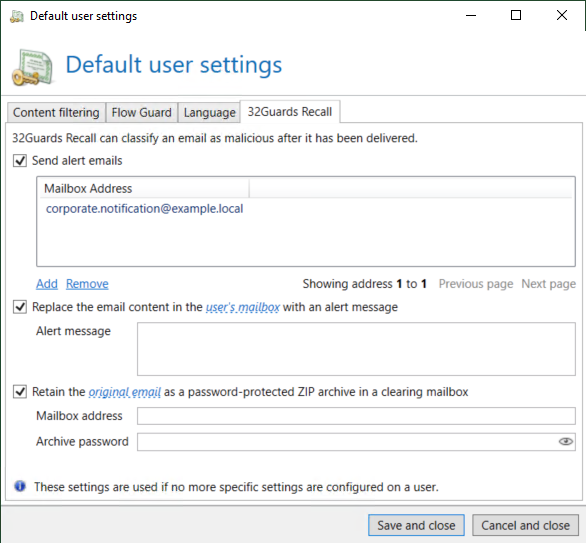
Send alert emails
Enable Send alert emails to be notified of recall operations that have been carried out.
Mailbox address
Enter one or more recipient addresses.
Typical recipients
-
Administrators
-
Security teams
-
Helpdesk staff
-
Incident response teams
Recipients will receive a notification as soon as a recall has been carried out.
Replace the email content
Enable Replace the email content in the user's mailbox with an alert message box to remove the original content of the message. A notification message is displayed in the inbox instead of the original content.
Alert message
Use the Alert message field to define the text that is displayed to the user.
Example:
Retain the original email in the clearing mailbox
Enable Retain the original email as a password-protected ZIP archive in a clearing mailbox if you wish to retain the message for later analysis.
The original message will be
-
removed from the user’s mailbox,
-
archived as a ZIP file,
-
protected by a password and
-
transferred to the designated clearing mailbox.
Mailbox address
Address of the clearing mailbox.
A dedicated analytics or security mailbox is recommended for this mailbox.
Archive password
A password to protect the ZIP files created.