D-Trust
- Go to Identities > Key enrolment > Key enrolment provider.
- Click Add.
- Select D-Trust as the provider.
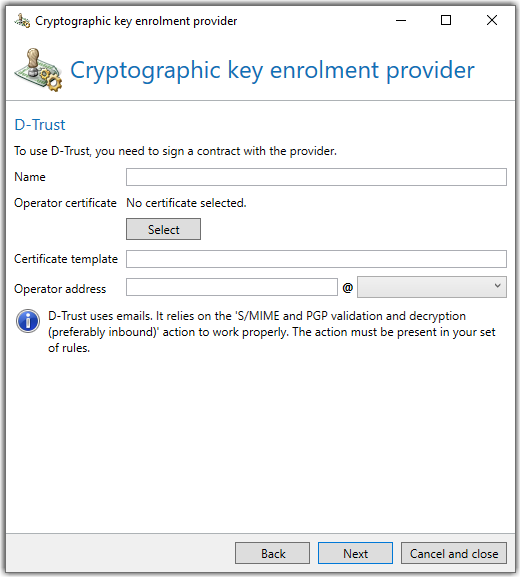
- Enter the name of the certificate template and the operator address. You can obtain both information from D-Trust. See Supported certificate templates.
NOTE: The operator address is the email address that is used to handle requests. This address is used as the sender address for all requests and must be reachable.
- Enter a prefix if you want to request a pseudonymised certificate. Alternatively, select one of the default values pseudonym or pseudo.
- Determine whether you want to publish your key to Open Keys. See Using Open Keys.
- Click Finish.
NOTE: In order to use D-Trust as a provider, you must have concluded a valid contract with Deutsche Bundesdruckerei and imported the D-Trust certificate int the certificate administration.
Supported certificate templates
-
ADVANCED_PERSONAL_ID
-
ADVANCED_PERSONAL_ID_P12_SMS
-
ADVANCED_PERSONAL_ID_RSA-PSS
-
ADVANCED_ENTERPRISE_ID
-
ADVANCED_ENTERPRISE_ID_P12_SMS
-
ADVANCED_ENTERPRISE_ID_RSA-PSS
-
ADVANCED_ENTERPRISE_SIG_ID
-
ADVANCED_ENTERPRISE_SIG_ID_P12_SMS
-
ADVANCED_ENTERPRISE_ENC_ID
-
ADVANCED_ENTERPRISE_ENC_ID_P12_SMS
-
ADVANCED_TEAM_ID
-
ADVANCED_TEAM_ID_P12_SMS
-
ADVANCED_TEAM_ID_RSA-PSS
-
ADVANCED_TEAM_ID_RSA-PSS_P12_SMS
-
SMIME_ENT_CMP
-
SMIME_INDIV_RSA
-
SMIME_INDIV_P12_SMS_RSA
-
SMIME_INDIV_RSA-PSS
-
SMIME_ORG_INDIV_RSA
-
SMIME_ORG_INDIV_P12_SMS_RSA
-
SMIME_ORG_INDIV_P12_CMP_RSA
-
SMIME_ORG_INDIV_RSA-PSS
-
SMIME_ORG_INDIV_SIG_RSA
-
SMIME_ORG_INDIV_SIG_P12_SMS_RSA
-
SMIME_ORG_INDIV_ENC_RSA
-
SMIME_ORG_INDIV_ENC_P12_SMS_RSA
-
SMIME_ORG_RSA
-
SMIME_ORG_P12_SMS_RSA
-
SMIME_ORG_RSA-PSS
-
SMIME_ORG_P12_SMS_RSA-PSS
-
SMIME_RSA
-
SMIME_P12_SMS_RSA